<h3>1、时区问题</h3>
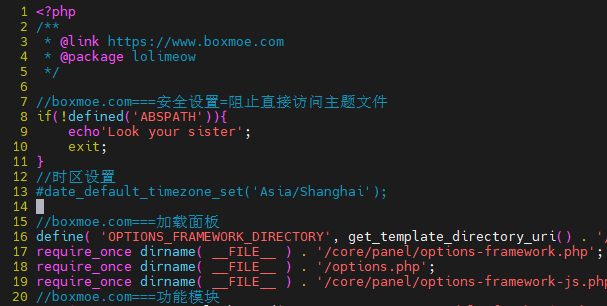
<p>当前主题lolimeow中,/wp-content/themes/lolimeow-master/functions.php
<img src="https://blog.drivod.top/wp-content/uploads/2026/01/image-1767774846694.png" alt="file" />
需要注释时区设置,否则会有奇怪冲突似乎</p>
<h3>2、主题调整</h3>
<h4>视频src调整</h4>
<p>/wp-content/themes/lolimeow-master/core/module/fun-shortcode.php:
227行,原有代码读取标签和插入不一致导致视频src无法正确填充
调整后代码</p>
<pre><code>add_shortcode('video', 'video_shortcode');
function video_shortcode( $attr , $content = ' ') {
// 合并默认参数和用户传入的参数,重点读取mp4参数
$atts = shortcode_atts( array(
'mp4' => '', // 对应你短代码里的mp4参数
'width' => '1280', // 默认宽度
'height' => '720' // 默认高度
), $attr );
// 检查mp4链接是否存在,避免空链接
if (empty($atts['mp4'])) {
return '<p>视频链接不能为空</p>';
}
// 拼接视频HTML,使用正确的mp4参数,宽高也使用短代码里的值
$out = '<video preload="none" controls="controls" width="'.esc_attr($atts['width']).'" height="'.esc_attr($atts['height']).'">
<source type="video/mp4" src="'.esc_attr($atts['mp4']).'">
</video>';
return $out;
}</code></pre>
<h4>css样式调整</h4>
<p>不多赘述,f12查看对应元素css,在源代码里搜索既可
核心调整背景颜色,字体大小等
关键字</p>
<pre><code>.post-single pre.prettyprint ol.linenums li
.single-content code</code></pre>
<h4>转义异常处理</h4>
<p>使用了插件wd githuber md,仍未找到完美的转义修复方案,因为在后管编辑中转义和解析后都不一致
主题的functions.php中添加
这里不贴代码块是因为这段代码无法被完美转义与解析
<a href="https://blog.drivod.top/wp-content/uploads/2026/01/WordPress转义修复.txt" title="WordPress转义修复">WordPress转义修复</a></p>1、时区问题
当前主题lolimeow中,/wp-content/themes/lolimeow-master/functions.php

需要注释时区设置,否则会有奇怪冲突似乎
2、主题调整
视频src调整
/wp-content/themes/lolimeow-master/core/module/fun-shortcode.php:
227行,原有代码读取标签和插入不一致导致视频src无法正确填充
调整后代码
add_shortcode('video', 'video_shortcode');
function video_shortcode( $attr , $content = ' ') {
    // 合并默认参数和用户传入的参数,重点读取mp4参数
    $atts = shortcode_atts( array(
        'mp4' => '',     // 对应你短代码里的mp4参数
        'width' => '1280',  // 默认宽度
        'height' => '720'   // 默认高度
    ), $attr );

    // 检查mp4链接是否存在,避免空链接
    if (empty($atts['mp4'])) {
        return '<p>视频链接不能为空</p>';
    }

    // 拼接视频HTML,使用正确的mp4参数,宽高也使用短代码里的值
    $out = '<video preload="none" controls="controls" width="'.esc_attr($atts['width']).'" height="'.esc_attr($atts['height']).'">
                <source type="video/mp4" src="'.esc_attr($atts['mp4']).'">
            </video>';
    return $out;
}
css样式调整
不多赘述,f12查看对应元素css,在源代码里搜索既可
核心调整背景颜色,字体大小等
关键字
.post-single pre.prettyprint ol.linenums li
.single-content code
转义异常处理
使用了插件wd githuber md,仍未找到完美的转义修复方案,因为在后管编辑中转义和解析后都不一致
主题的functions.php中添加
这里不贴代码块是因为这段代码无法被完美转义与解析
WordPress转义修复
评论(0)
暂无评论